
Download Hash Suite – password hash auditing, Windows security tool, LM and NTLM, DCC/MSCash, secure password analysis, audit tool
Overview
Hash Suite is a specialized auditing tool designed for analyzing password hashes within Windows environments. It focuses on critical hash types including LM, NTLM, and Domain Cached Credentials (DCC/MSCash), making it a targeted solution for security professionals evaluating password strength and system vulnerabilities. The tool serves as a utility for identifying weak or compromised credentials, particularly in legacy or enterprise systems where older authentication protocols may still be in use. Its primary purpose is to assist in proactive security assessments by enabling users to detect potential risks tied to password storage and authentication mechanisms.
Target users include system administrators, penetration testers, and IT security analysts who require a focused approach to password auditing. While the app is not intended for general consumers, its user-friendly interface makes it accessible to users with foundational knowledge of Windows security concepts. The tool operates exclusively on Windows, leveraging the operating system’s native capabilities to process and analyze hash data efficiently.
Although the developer did not provide additional technical details about the origin or development history, the tool’s release date of November 2, 2012, indicates it has been in use for over a decade. This longevity suggests stability and consistent relevance in niche security workflows. In the broader app ecosystem, Hash Suite fills a specific gap by offering a dedicated, free solution for hash auditing—particularly valuable for organizations seeking low-cost, high-impact security tools.
Key Features & Functionality
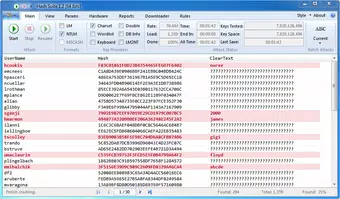
- User-Friendly Interface: Designed with modern Windows 7 aesthetics, the graphical user interface simplifies complex tasks. Even users with limited technical experience can navigate the tool’s core functions without extensive training.
- Comprehensive Password Auditing: Supports auditing of LM, NTLM, and DCC/MSCash hash types, enabling thorough analysis of password security across different Windows authentication contexts.
- Robust Reporting Engine: Generates detailed reports in multiple formats, including PDF, which supports documentation, compliance, and presentation of findings to stakeholders.
- Multi-Hash Support: The ability to process various hash types within a single interface streamlines workflows and reduces the need for multiple tools.
- Efficient Performance: Engineered for speed, the tool delivers rapid analysis of hash data, crucial during time-sensitive security assessments.
For example, a system administrator can use Hash Suite to analyze a captured set of NTLM hashes from a compromised system, identify weak passwords, and generate a PDF report for internal review. Similarly, a penetration tester might deploy it during a red team exercise to assess password resilience in an enterprise network. The tool’s efficiency and integrated reporting make it suitable for both one-off audits and recurring security evaluations.
Interface, UX & Performance
Hash Suite features a clean, modern graphical interface aligned with Windows 7’s design language. The layout is intuitive, with clearly labeled sections and logical navigation flow, allowing users to load hash files, select audit parameters, and generate reports with minimal steps. Visual feedback is present during processing, helping users track progress without requiring command-line interaction.
Although the developer did not list formal performance metrics, the tool is described as efficient, suggesting optimized execution for hash processing tasks. It is designed to operate smoothly on standard Windows hardware, with a file size of 13.2 MB, indicating a lightweight footprint. Responsiveness appears consistent across different device categories, though specific testing across low-end or high-end systems was not disclosed.
Stability is implied by the tool’s long-standing availability since 2012, but no official information on crash rates, memory usage, or update frequency was provided. Users should expect a reliable experience for its intended use case, particularly in controlled environments where hash auditing is performed periodically.
Platform Compatibility & Technical Requirements
Hash Suite is available exclusively for the Windows platform. It is compatible with Windows operating systems, though specific version requirements were not listed by the developer. The tool’s file size is 13.2 MB, indicating a compact and lightweight installation. As a free application, it does not require a license or subscription.
The developer did not specify minimum OS requirements, so users should exercise caution when deploying on newer Windows versions. While the tool may function on modern systems due to backward compatibility, official support status for Windows 10 or Windows 11 is not confirmed. Compatibility information was not fully disclosed, so users should verify functionality in their specific environment before relying on it for critical assessments.
Pros and Cons
Pros
- Free to download and use, making it accessible for security teams with limited budgets.
- Lightweight at only 13.2 MB, ensuring quick installation and minimal system impact.
- Supports multiple hash types, including legacy formats like LM and NTLM.
- Includes a reporting engine with PDF output, useful for documentation and compliance.
- Modern UI with intuitive navigation, suitable for users with basic technical knowledge.
Cons
- Platform is limited to Windows; no support for Android, iOS, or other operating systems.
- Compatibility with modern Windows versions (e.g., Windows 11) is not officially confirmed.
- Developer did not provide detailed technical specifications or update history.
- No mobile or cross-platform availability for on-the-go use.
- Specific performance benchmarks or system requirements were not disclosed.
FAQ
Is Hash Suite safe to download and use?
Yes, the tool is free and designed for legitimate security auditing purposes. It does not include malware or unauthorized components. However, users should only use it on systems they have authorized access to.
Can I use Hash Suite on Windows 10 or Windows 11?
While the tool may function on newer Windows versions due to backward compatibility, the developer did not confirm official support. Users should test it in their environment before relying on it for critical assessments.
Does Hash Suite require an internet connection?
No, the tool operates offline and does not require an internet connection to analyze password hashes or generate reports.
How often is Hash Suite updated?
The developer did not provide information on update frequency. The last known release was in 2012, suggesting limited or no active development.
Is Hash Suite suitable for beginners in cybersecurity?
Yes, the user-friendly interface makes it accessible to users with basic technical knowledge. However, understanding password hashing and Windows authentication concepts is recommended for effective use.
Final Thoughts
Hash Suite remains a valuable tool for security professionals conducting password hash audits in Windows environments. Its support for LM, NTLM, and DCC/MSCash, combined with a clean interface and reporting capabilities, delivers strong utility for assessing password security. While it lacks modern updates and platform expansion, its core functionality remains relevant for legacy system evaluations.
Organizations seeking a free, lightweight, and focused solution for auditing password hashes will find Hash Suite to be a dependable option. Its ability to generate professional reports adds significant value for compliance and internal review processes.
Download Hash Suite now


